Back to School Voucher Design Essentials
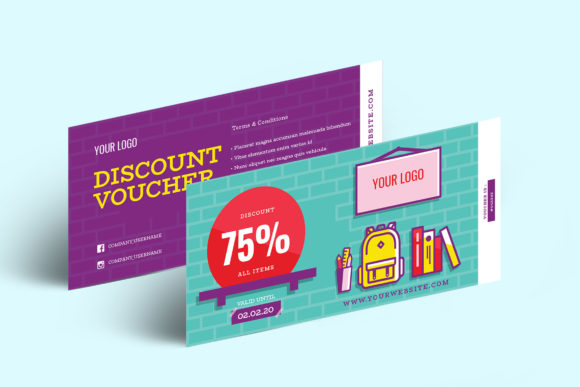
When you need to produce vouchers that look polished and professional without starting from a blank canvas, the Back to School Voucher and Gift Voucher Vol.7 set offers a practical shortcut. This collection of four 8-inch by 4-inch templates is built for creators, marketers, educators, and small business owners who value both speed and quality. Whether you are preparing a seasonal promotion, a classroom reward system, or a client appreciation card, having a fully customizable file in multiple formats removes most of the friction from the design process.
What This Voucher Set Offers
The core of this product is a set of four distinct voucher templates, each measuring 8 inches by 4 inches. That size is a sweet spot for printed vouchers, gift cards, and promotional coupons because it fits standard card stock and feels substantial in hand. Every template is fully editable, and the package includes AI, EPS, and PSD formats. This means you can open the files in Adobe Illustrator, Photoshop, or Affinity Designer and make any change you need. The colors are set to CMYK with a 300 DPI resolution, so your printed results will be sharp and print-ready straight from the file.
One of the strongest features here is the organized layer structure. Instead of hunting through a messy file to find the text layer or background element, everything is grouped logically. This saves time and reduces errors, especially if you are producing several variations of the same voucher. The package also specifies that a free font is used, which keeps your costs down and avoids licensing headaches.
Practical Applications Across Different Settings
This voucher set is not limited to one type of user. Its versatility comes from the clean, professional design that can be adapted to many contexts.
For Educators and School Administrators
If you work in a school or run an educational program, the Back to School Voucher theme is directly relevant. Use the templates to create reward certificates for students who meet reading goals or behavior milestones. You can also design gift vouchers for parents to use at school fundraisers or book fairs. The school theme makes these vouchers feel intentional rather than generic, which strengthens the connection to your community.
For example, a teacher might customize one voucher as a "Homework Pass" and another as a "Free Book Voucher" for a classroom rewards program. The 4x8 size fits neatly into a binder or a reward jar. Because the files are layered, swapping out the text and adjusting the colors to match school branding takes only a few minutes.
For Small Business Owners and Entrepreneurs
Retailers, cafes, service providers, and online shops can repurpose these templates for customer loyalty programs, referral incentives, or seasonal sales. The gift voucher format is ideal for businesses that sell physical products or services. A boutique shop could use the back-to-school theme to promote a fall collection, while a tutoring service might offer discounted sessions with a voucher that feels professional and trustworthy.
The CMYK color space and 300 DPI resolution are critical here. If you send a voucher to a commercial printer, you need those specifications to avoid color shifts and blurry edges. This set takes that worry off the table. You can also use the templates for digital distribution by converting them to RGB if needed, but the base files are optimized for print.
For Freelancers and Designers
If you are a graphic designer or a freelancer who produces marketing materials for clients, having a well-organized template set like this is a time-saver. Instead of building a voucher layout from scratch, you start with a professional base and customize it for each client. The organized layers make it easy to replace placeholder text, swap images, and adjust colors without breaking the design.
You can also offer clients multiple voucher options from the same set. Because the volume includes four distinct designs, you can present variations in a single pitch. This adds perceived value and gives your client a choice without extra design hours.
Key Strengths of This Template Set
Let me highlight a few specific qualities that make this product stand out compared to generic templates you might find elsewhere.
- Format flexibility: AI, EPS, and PSD cover the most common professional design tools. You are not locked into one software ecosystem.
- Print-ready specs: The 300 DPI and CMYK settings mean what you see on screen will match what comes off the press. No color correction or resolution adjustments are needed before printing.
- Organized layers: This is a small detail that makes a big difference in workflow. You can hide, lock, or edit individual elements without disrupting the rest of the file.
- Free font included: You do not have to purchase a font license or hunt down the exact typeface. The font is specified and available at no additional cost.
- Fully customizable: Every element, from the background to the typography, can be changed. This lets you adapt the voucher to your specific brand or occasion.
Usability and Efficiency in Real-World Workflows
One of the biggest frustrations with pre-made templates is that they often require more cleanup than starting from scratch. Layers are flattened, fonts are missing, or the resolution is set for web use only. This set avoids those common pitfalls. The organized layers let you quickly locate the text layer for the voucher value, the recipient name, or the expiration date. You can change colors in seconds using the swatch panel or the color picker.
For someone producing a batch of vouchers for a school event or a small business promotion, efficiency matters. You may need to generate ten variations with different amounts or messages. With a well-structured PSD, you can duplicate the file and edit each version without worrying about breaking the layout. The consistent layer naming across all four templates also helps if you are working on multiple designs simultaneously.
Communication and Branding Benefits
A voucher is a form of communication. It tells the recipient that they are receiving something of value and that the issuer is organized and professional. When you use a template that is clean and well-designed, you reinforce that message. The Back to School Voucher set has a modern, approachable aesthetic that works well for both formal and casual contexts.
If you are running a promotion for a back-to-school event, the design theme immediately signals relevance. Parents, teachers, and students will recognize the context and feel that the offer is tailored to them. For a business that targets families, this alignment can improve response rates. Even if you strip away the school-specific elements and replace them with your own graphics, the underlying layout remains strong and balanced.
Practical Considerations When Using These Templates
Before you start customizing, there are a few things to keep in mind to get the best results.
- Check your software version. AI, EPS, and PSD files require compatible design applications. Make sure your version of Illustrator, Photoshop, or Affinity Designer can open the file format you choose. If you are using a newer version of the software, most older file formats will open without issue, but it is worth verifying.
- Confirm free font availability. The product states that a free font is used. Download and install it before opening the template to avoid missing font warnings. The font choice is usually listed in the product description or the readme file.
- Test print a sample. Even with CMYK and 300 DPI, it is a good idea to print one test voucher on your chosen paper stock. This lets you check alignment, color accuracy, and overall appearance before committing to a full print run.
- Make a backup of the original files. Before you start editing, save a copy of the untouched template. If you need to start over or create a different version later, you will have a clean base to work from.
- Consider your audience. The 4x8 size is great for vouchers, but think about how the recipient will receive it. Will it be handed out in person, mailed, or displayed digitally? Print and digital use cases may require slight adjustments to color space or resolution.
Where This Template Fits in a Broader Strategy
Vouchers are a staple of customer engagement and retention strategies. They work well for acquisition campaigns, loyalty programs, and seasonal promotions. Having a professional template on hand means you can launch a campaign quickly without waiting on a designer or struggling with layout software.
If you are a blogger or content creator, you can also use these templates to create giveaways for your audience. A well-designed voucher adds legitimacy to a contest and makes your brand look more established. For marketers, the ability to produce consistent, branded vouchers across multiple campaigns builds recognition and trust.
Educators can integrate vouchers into classroom management systems. A voucher with a school theme feels more relevant to students than a generic certificate. It can be used as a tangible reward that students value and remember.
A Few Observations From Working With Similar Products
Over the years, I have worked with dozens of template sets for vouchers, certificates, and promotional materials. The ones that consistently save time and produce great results share a few traits: clean layer organization, print-ready specifications, and flexibility in customization. This Back to School Voucher and Gift Voucher Vol.7 set hits all three points.
The 4x8 format is a practical choice. It is large enough to include all the necessary information, yet compact enough to fit standard envelopes or display racks. The CMYK color model ensures that what you design on screen translates faithfully to paper, which is something many users overlook until they get a disappointing print result.
I would recommend this set to anyone who needs to produce vouchers in small to medium quantities, whether for a school event, a business promotion, or a personal project. The learning curve is minimal if you have basic design software experience. If you are new to editing layered files, the organized structure makes it easy to experiment without fear of breaking the design.
Ultimately, this product delivers what it promises: a professional, customizable base that saves hours of design time and produces results that look and feel intentional.