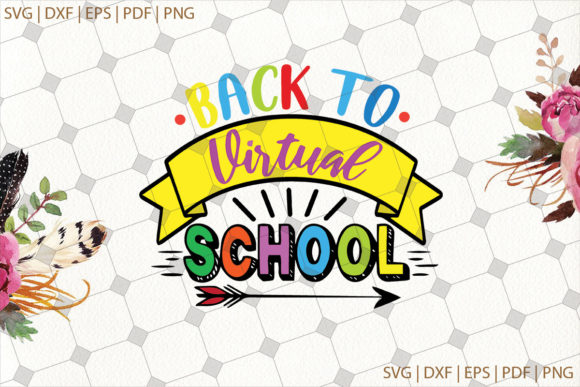
Back to School Digital Paper
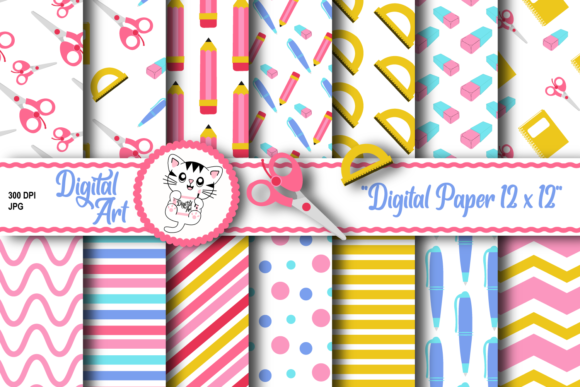
A printable digital paper pack offers more than just pattern files. It provides a flexible visual toolkit that can be adapted to numerous projects, from personal scrapbooking to business marketing materials. This particular collection contains 14 digital papers in JPG format, each 12 by 12 inches at 300 DPI, plus 4 clip art elements at 3600 pixels and 300 DPI. Understanding how to integrate these assets into your routine can save time, improve consistency, and expand the range of outputs you can produce.
Understanding the Role of Digital Paper in Your Workflow
Digital paper acts as a foundational asset in many creative processes. You can use it before a project starts, as you set the visual direction and choose patterns that align with a back to school theme. During the project, these files become the texture or background for invitations, gift wrap, or classroom decoration mockups. After the main work is done, the same papers can be repurposed for follow-up materials, like thank you cards or presentation slides, without starting from scratch. This layered use across different phases of a task reduces redundancy and keeps your output thematically unified.
The pack interacts well with common design tools. The JPG format is widely supported by software such as Adobe Photoshop, Canva, Affinity Designer, and even simple tools like Google Slides or Microsoft Word. The high resolution (300 DPI) ensures that when you scale or print, edges remain clean. The clip art pieces add quick accent elements, so you do not need to source separate icons or illustrations. By keeping all these files in one folder, you streamline your asset selection and avoid switching between multiple sources.
Practical Applications Across Different Domains
For small business owners, back to school digital papers can create branded stationery, packaging inserts, or social media backgrounds. Entrepreneurs running an online shop can design product tags, price cards, or small bookmarks to include with orders. The 12×12 size is ideal for standard craft cutting machines if you need precise shapes for labels or box toppers.
Educators and tutors can produce customized worksheets, bulletin board borders, or calendar covers. The patterns offer a subtle visual structure that makes printed materials feel polished without overwhelming the content. Birthday party planners or gift wrappers can use the bright school-themed designs to wrap small presents, create invitation cards, or assemble party hats. Scrapbookers working on memory albums will appreciate the selection of coordinating patterns and clip art that can serve as page accents.
Freelancers designing for clients can offer school-related branding packages that include these patterns as part of a collateral set. Because the papers are provided at a high DPI, they work well in both digital mockups and physical prints. The clip art items can be resized, recolored, or combined to create original compositions, giving you flexibility without extra design time.
Integrating Back to School Digital Paper into a Creative Process
A typical workflow might begin with selecting two or three patterns from the pack that share a complementary color palette. After deciding on the primary use, such as a desk calendar or an invitation, you import the JPG into your layout software. Set the canvas size to match your intended print dimensions, then drag the paper file in. Clip the image to a shape if needed, or keep it as a full background. The clip art can be placed on top, resized proportionally, and rotated to match the composition.
When printing for party decorations or gifts, check that your printer settings match the file’s color space. Most JPGs use sRGB, which works well for home and office printers. If you plan to send files to a commercial print shop, ask whether they prefer CMYK conversions. The 300 DPI resolution means you can scale down without losing detail, but avoid scaling up beyond 100% as it reduces sharpness. For digital-only uses, such as blog headers or social posts, you can reduce the file size to 72 DPI and resize the dimensions accordingly.
If you run a small production line, consider setting templates for common tasks. For instance, create a Canva template for bookmarks that automatically places a selected paper pattern and clip art. Then you can reuse and swap out papers from the pack quickly. This approach saves time if you are producing multiple variations for different clients or events.
Ensuring Quality and Consistency in Final Products
The specifications (12×12 inches at 300 DPI) give you a square canvas with enough area to cover many standard projects. When cutting or trimming, consider the pattern repeat. Some digital papers tile seamlessly, while others have a centered motif. Before printing a large batch, do a small test print on the paper you intend to use. Check that colors match your monitor and that the pattern aligns well with your project’s layout.
For long-term use, store the files in a dedicated folder with clear naming. Include a brief description of the pattern or color theme so you can find specific papers later without opening each one. Organizing by theme (stripes, polka dots, alphabets) or by dominant color makes browsing faster. When you need consistency across a series of items, reference the same digital paper file for each element, like enclosures and envelopes.
Organizing and Managing a Digital Paper Library
Over time, you may accumulate multiple digital paper packs. An organized library helps you maintain efficiency. Use subfolders for different themes, with the back to school pack placed in a “Seasonal” or “Educational” category. If you work with a team, store these files on a shared cloud drive and create a simple naming convention, such as “BTS_blue_stripes.jpg”. This reduces confusion and prevents duplicate purchases.
Backup your digital papers regularly. Because they are high‑resolution, they take up some space but are still small enough to fit on an external drive or a cloud account. For quick access, you can create a shortcut folder on your desktop for active projects. After the school season ends, archive the folder but keep it accessible for any last‑minute requests or future repurposing.
Scaling Up for Small Business and Client Projects
If you sell completed products such as invitation suites, party décor kits, or classroom bundles, having a versatile digital paper pack means you can produce multiple listings with a unified look. Combine the included clip art with your own logos or text to create branded items. Batch processing becomes easier when you design one base template and swap out patterns for different customers. For example, you could produce a standard “Back to School Celebration” invitation and change only the background paper and accent color to suit a buyer’s preferences.
Because the files are immediate downloads, you can send digital proofs to clients quickly. The high pixel count of the clip art (3600px) allows you to position them across larger surfaces while retaining sharpness. When packaging physical goods, the paper can be printed and cut into small decorative frames for photos or used as a background in clear plastic sleeves.
Long-Term Value and Repurposing
The back to school theme works well for many occasions beyond the start of classes. Neutral patterns like pencils, apples, or simple geometric shapes can be used for general stationery, note cards, or craft projects throughout the year. The clip art elements, such as a globe or a book, may serve as icons in digital presentations or as cutouts for handmade teacher gifts. By storing the files properly, you maximize the investment in this pack, applying its assets across multiple projects over months or even years.
If you combine this pack with other digital papers you own, you can create custom blends. Overlay a subtle pattern on top of a solid color to add texture without overwhelming the design. The possibilities multiply as you experiment with scale and opacity in your editing tool.
A well‑chosen digital paper pack like this one eliminates the need to design patterns from scratch. It provides a reliable starting point that fits into both personal and professional workflows. Whether you are making decorations, invitation cards, scrapbook pages, or product packaging, these files handle the visual foundation. With 14 papers and 4 clip art elements at high resolution, you have room to iterate, adapt, and produce ready‑to‑use results efficiently.